<?xml version="1.0" encoding="UTF-8"?>
<rss version="2.0"
	xmlns:content="http://purl.org/rss/1.0/modules/content/"
	xmlns:wfw="http://wellformedweb.org/CommentAPI/"
	xmlns:dc="http://purl.org/dc/elements/1.1/"
	xmlns:atom="http://www.w3.org/2005/Atom"
	xmlns:sy="http://purl.org/rss/1.0/modules/syndication/"
	xmlns:slash="http://purl.org/rss/1.0/modules/slash/"
	>

<channel>
	<title>Iceland Aurora Photographic &#187; light</title>
	<atom:link href="http://icelandaurora.com/blog/tag/light/feed/" rel="self" type="application/rss+xml" />
	<link>http://icelandaurora.com/blog</link>
	<description>Photography Techniques Weblog</description>
	<lastBuildDate>Sat, 14 Jan 2012 16:54:53 +0000</lastBuildDate>
	<language>en</language>
	<sy:updatePeriod>hourly</sy:updatePeriod>
	<sy:updateFrequency>1</sy:updateFrequency>
	<generator>http://wordpress.org/?v=3.3.1</generator>
		<item>
		<title>Night Photography 2 &#8211; overcoming the darkness</title>
		<link>http://icelandaurora.com/blog/2009/11/27/night-photography-2-overcoming-the-darkness/#utm_source=feed&#038;utm_medium=feed&#038;utm_campaign=feed</link>
		<comments>http://icelandaurora.com/blog/2009/11/27/night-photography-2-overcoming-the-darkness/#comments</comments>
		<pubDate>Fri, 27 Nov 2009 05:20:30 +0000</pubDate>
		<dc:creator>Tony</dc:creator>
				<category><![CDATA[Photography Techniques]]></category>
		<category><![CDATA[aurora borealis]]></category>
		<category><![CDATA[bracketting]]></category>
		<category><![CDATA[camera]]></category>
		<category><![CDATA[composition]]></category>
		<category><![CDATA[dark]]></category>
		<category><![CDATA[depth of field]]></category>
		<category><![CDATA[digital]]></category>
		<category><![CDATA[DOF]]></category>
		<category><![CDATA[DSLR]]></category>
		<category><![CDATA[exposure]]></category>
		<category><![CDATA[focus]]></category>
		<category><![CDATA[hdr]]></category>
		<category><![CDATA[highlights]]></category>
		<category><![CDATA[hyperfocal distance]]></category>
		<category><![CDATA[iceland]]></category>
		<category><![CDATA[image]]></category>
		<category><![CDATA[landscape]]></category>
		<category><![CDATA[light]]></category>
		<category><![CDATA[long exposure]]></category>
		<category><![CDATA[multiple exposure]]></category>
		<category><![CDATA[night photography]]></category>
		<category><![CDATA[photography]]></category>
		<category><![CDATA[pictures]]></category>
		<category><![CDATA[spirit level]]></category>
		<category><![CDATA[white balance]]></category>
		<category><![CDATA[wonky horizons]]></category>
		<category><![CDATA[workshop]]></category>

		<guid isPermaLink="false">http://icelandaurora.com/blog/?p=796</guid>
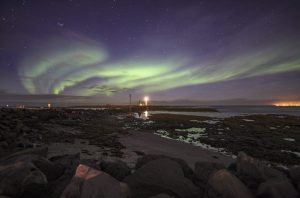
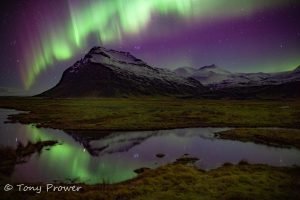
		<description><![CDATA[<p>So you have the night photography bug. You sit twiddling your thumbs in the daylight hours waiting for the light to fade so that you can go out and leave your camera perfectly still with its  shutter open for many tens of minutes.  You are not alone!!</p>]]></description>
		<wfw:commentRss>http://icelandaurora.com/blog/2009/11/27/night-photography-2-overcoming-the-darkness/feed/</wfw:commentRss>
		<slash:comments>6</slash:comments>
		</item>
		<item>
		<title>Photoshop Basics &#8211; noise reduction</title>
		<link>http://icelandaurora.com/blog/2009/08/21/photoshop-basics-noise-reduction/#utm_source=feed&#038;utm_medium=feed&#038;utm_campaign=feed</link>
		<comments>http://icelandaurora.com/blog/2009/08/21/photoshop-basics-noise-reduction/#comments</comments>
		<pubDate>Fri, 21 Aug 2009 22:41:09 +0000</pubDate>
		<dc:creator>Tony</dc:creator>
				<category><![CDATA[Photoshop Techniques]]></category>
		<category><![CDATA[avoid noise]]></category>
		<category><![CDATA[coloured dots]]></category>
		<category><![CDATA[digital noise]]></category>
		<category><![CDATA[DSLR]]></category>
		<category><![CDATA[electrical interference]]></category>
		<category><![CDATA[electrical noise]]></category>
		<category><![CDATA[full frame]]></category>
		<category><![CDATA[High iso]]></category>
		<category><![CDATA[image]]></category>
		<category><![CDATA[ISO]]></category>
		<category><![CDATA[light]]></category>
		<category><![CDATA[light source.]]></category>
		<category><![CDATA[Long exposures]]></category>
		<category><![CDATA[low-light]]></category>
		<category><![CDATA[night photography]]></category>
		<category><![CDATA[noise]]></category>
		<category><![CDATA[photo]]></category>
		<category><![CDATA[photography]]></category>
		<category><![CDATA[photoshop]]></category>
		<category><![CDATA[picture]]></category>
		<category><![CDATA[sensor]]></category>
		<category><![CDATA[tutorial]]></category>
		<category><![CDATA[unacceptable noise]]></category>
		<category><![CDATA[workshop]]></category>

		<guid isPermaLink="false">http://icelandaurora.com/blog/?p=284</guid>
		<description><![CDATA[<p>No camera is perfect. If we push it to the limits of iso and low-light scenes, we are going to experience the number one weakness of a digital camera &#8211; NOISE.</p>]]></description>
		<wfw:commentRss>http://icelandaurora.com/blog/2009/08/21/photoshop-basics-noise-reduction/feed/</wfw:commentRss>
		<slash:comments>0</slash:comments>
		</item>
		<item>
		<title>Layers and Masks 2 &#8211; Adjustment Layers</title>
		<link>http://icelandaurora.com/blog/2009/08/06/layers-and-masks-2-adjustment-layers/#utm_source=feed&#038;utm_medium=feed&#038;utm_campaign=feed</link>
		<comments>http://icelandaurora.com/blog/2009/08/06/layers-and-masks-2-adjustment-layers/#comments</comments>
		<pubDate>Thu, 06 Aug 2009 22:57:48 +0000</pubDate>
		<dc:creator>Tony</dc:creator>
				<category><![CDATA[Photoshop Techniques]]></category>
		<category><![CDATA[adjustment]]></category>
		<category><![CDATA[basic]]></category>
		<category><![CDATA[contrast]]></category>
		<category><![CDATA[dark]]></category>
		<category><![CDATA[highlight]]></category>
		<category><![CDATA[histogram]]></category>
		<category><![CDATA[image]]></category>
		<category><![CDATA[layers]]></category>
		<category><![CDATA[levels]]></category>
		<category><![CDATA[light]]></category>
		<category><![CDATA[masks]]></category>
		<category><![CDATA[photography]]></category>
		<category><![CDATA[photoshop]]></category>
		<category><![CDATA[shadows]]></category>
		<category><![CDATA[workshop]]></category>

		<guid isPermaLink="false">http://icelandaurora.wordpress.com/?p=27</guid>
		<description><![CDATA[<p><span style="color:#888888;"><strong>Layers and Masks 2 &#8211; Adjustment Layers</strong></span></p>]]></description>
		<wfw:commentRss>http://icelandaurora.com/blog/2009/08/06/layers-and-masks-2-adjustment-layers/feed/</wfw:commentRss>
		<slash:comments>2</slash:comments>
		</item>
		<item>
		<title>Basic adjustments &#8211; Curves</title>
		<link>http://icelandaurora.com/blog/2009/08/06/basic-adjustments-curves/#utm_source=feed&#038;utm_medium=feed&#038;utm_campaign=feed</link>
		<comments>http://icelandaurora.com/blog/2009/08/06/basic-adjustments-curves/#comments</comments>
		<pubDate>Thu, 06 Aug 2009 22:56:57 +0000</pubDate>
		<dc:creator>Tony</dc:creator>
				<category><![CDATA[Photoshop Techniques]]></category>
		<category><![CDATA[adjustment]]></category>
		<category><![CDATA[basic]]></category>
		<category><![CDATA[contrast]]></category>
		<category><![CDATA[curves]]></category>
		<category><![CDATA[dark]]></category>
		<category><![CDATA[highlights]]></category>
		<category><![CDATA[histogram]]></category>
		<category><![CDATA[layers]]></category>
		<category><![CDATA[light]]></category>
		<category><![CDATA[photography]]></category>
		<category><![CDATA[photoshop]]></category>
		<category><![CDATA[shadow]]></category>
		<category><![CDATA[workshop]]></category>

		<guid isPermaLink="false">http://icelandaurora.wordpress.com/?p=46</guid>
		<description><![CDATA[<p>Like layers, curve adjustments is a way of adjusting the brightness/ darkness levels in an image. The emphasis is put more on contrast and adjusting curves is a very smooth and sophisticated way of adjusting contrast.</p>]]></description>
		<wfw:commentRss>http://icelandaurora.com/blog/2009/08/06/basic-adjustments-curves/feed/</wfw:commentRss>
		<slash:comments>3</slash:comments>
		</item>
		<item>
		<title>Basic Adjustments &#8211; Levels</title>
		<link>http://icelandaurora.com/blog/2009/08/06/basic-adjustments-levels/#utm_source=feed&#038;utm_medium=feed&#038;utm_campaign=feed</link>
		<comments>http://icelandaurora.com/blog/2009/08/06/basic-adjustments-levels/#comments</comments>
		<pubDate>Thu, 06 Aug 2009 22:35:01 +0000</pubDate>
		<dc:creator>Tony</dc:creator>
				<category><![CDATA[Photoshop Techniques]]></category>
		<category><![CDATA[adjustment]]></category>
		<category><![CDATA[basic]]></category>
		<category><![CDATA[contrast]]></category>
		<category><![CDATA[dark]]></category>
		<category><![CDATA[highlights]]></category>
		<category><![CDATA[histogram]]></category>
		<category><![CDATA[layers]]></category>
		<category><![CDATA[levels]]></category>
		<category><![CDATA[light]]></category>
		<category><![CDATA[photography]]></category>
		<category><![CDATA[photoshop]]></category>
		<category><![CDATA[shadow]]></category>
		<category><![CDATA[workshop]]></category>

		<guid isPermaLink="false">http://icelandaurora.wordpress.com/?p=35</guid>
		<description><![CDATA[<h4><span style="color:#888888;">Basic Adjustments &#8211; Levels</span></h4>
<p>When you adjust levels, you are adjusting the range of the brightness/ darkness levels in an image.  This is determined through a histogram. The histogram displays the distribution of the different light value in an image. For example, a dark image would have a lot of value at the dark end of the spectrum (left hand side of the histogram), a bright image would have a lot of values at the bright end (right hand side).</p>]]></description>
		<wfw:commentRss>http://icelandaurora.com/blog/2009/08/06/basic-adjustments-levels/feed/</wfw:commentRss>
		<slash:comments>2</slash:comments>
		</item>
	</channel>
</rss>