<?xml version="1.0" encoding="UTF-8"?>
<rss version="2.0"
	xmlns:content="http://purl.org/rss/1.0/modules/content/"
	xmlns:wfw="http://wellformedweb.org/CommentAPI/"
	xmlns:dc="http://purl.org/dc/elements/1.1/"
	xmlns:atom="http://www.w3.org/2005/Atom"
	xmlns:sy="http://purl.org/rss/1.0/modules/syndication/"
	xmlns:slash="http://purl.org/rss/1.0/modules/slash/"
	>

<channel>
	<title>Iceland Aurora Photographic &#187; exposure</title>
	<atom:link href="http://icelandaurora.com/blog/tag/exposure/feed/" rel="self" type="application/rss+xml" />
	<link>http://icelandaurora.com/blog</link>
	<description>Photography Techniques Weblog</description>
	<lastBuildDate>Sat, 14 Jan 2012 16:54:53 +0000</lastBuildDate>
	<language>en</language>
	<sy:updatePeriod>hourly</sy:updatePeriod>
	<sy:updateFrequency>1</sy:updateFrequency>
	<generator>http://wordpress.org/?v=3.3.1</generator>
		<item>
		<title>Night Photography 2 &#8211; overcoming the darkness</title>
		<link>http://icelandaurora.com/blog/2009/11/27/night-photography-2-overcoming-the-darkness/#utm_source=feed&#038;utm_medium=feed&#038;utm_campaign=feed</link>
		<comments>http://icelandaurora.com/blog/2009/11/27/night-photography-2-overcoming-the-darkness/#comments</comments>
		<pubDate>Fri, 27 Nov 2009 05:20:30 +0000</pubDate>
		<dc:creator>Tony</dc:creator>
				<category><![CDATA[Photography Techniques]]></category>
		<category><![CDATA[aurora borealis]]></category>
		<category><![CDATA[bracketting]]></category>
		<category><![CDATA[camera]]></category>
		<category><![CDATA[composition]]></category>
		<category><![CDATA[dark]]></category>
		<category><![CDATA[depth of field]]></category>
		<category><![CDATA[digital]]></category>
		<category><![CDATA[DOF]]></category>
		<category><![CDATA[DSLR]]></category>
		<category><![CDATA[exposure]]></category>
		<category><![CDATA[focus]]></category>
		<category><![CDATA[hdr]]></category>
		<category><![CDATA[highlights]]></category>
		<category><![CDATA[hyperfocal distance]]></category>
		<category><![CDATA[iceland]]></category>
		<category><![CDATA[image]]></category>
		<category><![CDATA[landscape]]></category>
		<category><![CDATA[light]]></category>
		<category><![CDATA[long exposure]]></category>
		<category><![CDATA[multiple exposure]]></category>
		<category><![CDATA[night photography]]></category>
		<category><![CDATA[photography]]></category>
		<category><![CDATA[pictures]]></category>
		<category><![CDATA[spirit level]]></category>
		<category><![CDATA[white balance]]></category>
		<category><![CDATA[wonky horizons]]></category>
		<category><![CDATA[workshop]]></category>

		<guid isPermaLink="false">http://icelandaurora.com/blog/?p=796</guid>
		<description><![CDATA[<p>So you have the night photography bug. You sit twiddling your thumbs in the daylight hours waiting for the light to fade so that you can go out and leave your camera perfectly still with its  shutter open for many tens of minutes.  You are not alone!!</p>]]></description>
		<wfw:commentRss>http://icelandaurora.com/blog/2009/11/27/night-photography-2-overcoming-the-darkness/feed/</wfw:commentRss>
		<slash:comments>6</slash:comments>
		</item>
		<item>
		<title>Exposing to the right</title>
		<link>http://icelandaurora.com/blog/2009/11/01/exposing-to-the-right/#utm_source=feed&#038;utm_medium=feed&#038;utm_campaign=feed</link>
		<comments>http://icelandaurora.com/blog/2009/11/01/exposing-to-the-right/#comments</comments>
		<pubDate>Sun, 01 Nov 2009 12:55:10 +0000</pubDate>
		<dc:creator>Tony</dc:creator>
				<category><![CDATA[Photography Techniques]]></category>
		<category><![CDATA[adjustment]]></category>
		<category><![CDATA[auto-bracketting]]></category>
		<category><![CDATA[bracketting]]></category>
		<category><![CDATA[camera]]></category>
		<category><![CDATA[color]]></category>
		<category><![CDATA[colour]]></category>
		<category><![CDATA[exposure]]></category>
		<category><![CDATA[High iso]]></category>
		<category><![CDATA[highlights]]></category>
		<category><![CDATA[histogram]]></category>
		<category><![CDATA[image]]></category>
		<category><![CDATA[landscape]]></category>
		<category><![CDATA[multiple exposure]]></category>
		<category><![CDATA[night photography]]></category>
		<category><![CDATA[over-expose]]></category>
		<category><![CDATA[photography]]></category>
		<category><![CDATA[pictures]]></category>
		<category><![CDATA[RAW]]></category>
		<category><![CDATA[saturation]]></category>

		<guid isPermaLink="false">http://icelandaurora.com/blog/?p=645</guid>
		<description><![CDATA[<p>Exposure is a critical element in photography.  Until recently it was common practice for landscape photographers to slightly underexpose image to increase highlight detail and increase saturation. But there is a new school of thought which suggests over exposing just short of blowing out the highlights will actually give you a better range of colours.</p>]]></description>
		<wfw:commentRss>http://icelandaurora.com/blog/2009/11/01/exposing-to-the-right/feed/</wfw:commentRss>
		<slash:comments>0</slash:comments>
		</item>
		<item>
		<title>Advanced Photoshop &#8211; Dramatic Mono Conversion</title>
		<link>http://icelandaurora.com/blog/2009/11/01/advanced-photoshop-dramatic-mono-conversion/#utm_source=feed&#038;utm_medium=feed&#038;utm_campaign=feed</link>
		<comments>http://icelandaurora.com/blog/2009/11/01/advanced-photoshop-dramatic-mono-conversion/#comments</comments>
		<pubDate>Sun, 01 Nov 2009 12:31:16 +0000</pubDate>
		<dc:creator>Tony</dc:creator>
				<category><![CDATA[Photoshop Techniques]]></category>
		<category><![CDATA[adjustment]]></category>
		<category><![CDATA[black and white conversion]]></category>
		<category><![CDATA[Burn]]></category>
		<category><![CDATA[contrast]]></category>
		<category><![CDATA[curves]]></category>
		<category><![CDATA[digital]]></category>
		<category><![CDATA[Dodge]]></category>
		<category><![CDATA[DSLR]]></category>
		<category><![CDATA[dynamic range]]></category>
		<category><![CDATA[exposure]]></category>
		<category><![CDATA[hdr]]></category>
		<category><![CDATA[highlights]]></category>
		<category><![CDATA[image]]></category>
		<category><![CDATA[layers]]></category>
		<category><![CDATA[levels]]></category>
		<category><![CDATA[mask]]></category>
		<category><![CDATA[Mono Conversion]]></category>
		<category><![CDATA[photography]]></category>
		<category><![CDATA[photoshop]]></category>
		<category><![CDATA[pictures]]></category>
		<category><![CDATA[shadows]]></category>
		<category><![CDATA[tonemap]]></category>
		<category><![CDATA[tutorial]]></category>
		<category><![CDATA[workshop]]></category>

		<guid isPermaLink="false">http://icelandaurora.com/blog/?p=624</guid>
		<description><![CDATA[<p>This tutorial looks at ways to convert your image to black and white using the tools available in Photoshop CS3. There may be work-arounds for other versions of photoshop or other image editors, but the work horse in this tutorial is the powerful &#8216;Black and White Tool&#8217; in CS3 which has a great selection of filter pre-sets. To emulate this without the tool, you could try blending channel levels.</p>]]></description>
		<wfw:commentRss>http://icelandaurora.com/blog/2009/11/01/advanced-photoshop-dramatic-mono-conversion/feed/</wfw:commentRss>
		<slash:comments>2</slash:comments>
		</item>
		<item>
		<title>Northern lights hotspots</title>
		<link>http://icelandaurora.com/blog/2009/09/01/northern-lights-hotspots/#utm_source=feed&#038;utm_medium=feed&#038;utm_campaign=feed</link>
		<comments>http://icelandaurora.com/blog/2009/09/01/northern-lights-hotspots/#comments</comments>
		<pubDate>Tue, 01 Sep 2009 22:59:16 +0000</pubDate>
		<dc:creator>Tony</dc:creator>
				<category><![CDATA[Iceland Photo Locations]]></category>
		<category><![CDATA[arctic]]></category>
		<category><![CDATA[aurora borealis]]></category>
		<category><![CDATA[dark]]></category>
		<category><![CDATA[digital]]></category>
		<category><![CDATA[DSLR]]></category>
		<category><![CDATA[exposure]]></category>
		<category><![CDATA[iceland]]></category>
		<category><![CDATA[image]]></category>
		<category><![CDATA[landscape]]></category>
		<category><![CDATA[long exposure]]></category>
		<category><![CDATA[night photography]]></category>
		<category><![CDATA[photography]]></category>
		<category><![CDATA[photoshop]]></category>
		<category><![CDATA[RAW]]></category>
		<category><![CDATA[summer]]></category>
		<category><![CDATA[weather]]></category>
		<category><![CDATA[white balance]]></category>
		<category><![CDATA[winter]]></category>

		<guid isPermaLink="false">http://icelandaurora.com/blog/?p=400</guid>
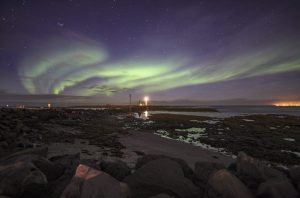
		<description><![CDATA[<p>The Aurora Borealis or Northern Lights is a light phenomenon that occurs as a result of solar winds reaching earth&#8217;s outer atmosphere and burning different gases to give a range of different colours. The best place to see them would surely be from a very high viewpoint just outside earth&#8217;s atmosphere.  Here on earth however, we need to travel to cold countries near the point where you would see the midnight sun in the summer and very short days in the winter. Iceland is one of those places. It is just touched by the Arctic circle on its very north isle of Grimsey, but most of Iceland is good for northern lights.</p>]]></description>
		<wfw:commentRss>http://icelandaurora.com/blog/2009/09/01/northern-lights-hotspots/feed/</wfw:commentRss>
		<slash:comments>0</slash:comments>
		</item>
		<item>
		<title>HDR4 &#8211; Photoshop enhancements</title>
		<link>http://icelandaurora.com/blog/2009/08/18/hdr4-photoshop-enhancements/#utm_source=feed&#038;utm_medium=feed&#038;utm_campaign=feed</link>
		<comments>http://icelandaurora.com/blog/2009/08/18/hdr4-photoshop-enhancements/#comments</comments>
		<pubDate>Tue, 18 Aug 2009 00:56:05 +0000</pubDate>
		<dc:creator>Tony</dc:creator>
				<category><![CDATA[Photoshop Techniques]]></category>
		<category><![CDATA[artefacts]]></category>
		<category><![CDATA[circle select]]></category>
		<category><![CDATA[cleaning]]></category>
		<category><![CDATA[Clone Brush]]></category>
		<category><![CDATA[colour]]></category>
		<category><![CDATA[curves]]></category>
		<category><![CDATA[digital]]></category>
		<category><![CDATA[exposure]]></category>
		<category><![CDATA[filter]]></category>
		<category><![CDATA[Gaussian blur]]></category>
		<category><![CDATA[graduated]]></category>
		<category><![CDATA[hdr]]></category>
		<category><![CDATA[Healing Tool]]></category>
		<category><![CDATA[hue]]></category>
		<category><![CDATA[image]]></category>
		<category><![CDATA[layers]]></category>
		<category><![CDATA[masks]]></category>
		<category><![CDATA[multiple exposure]]></category>
		<category><![CDATA[noise reduction]]></category>
		<category><![CDATA[opacity slider]]></category>
		<category><![CDATA[photo]]></category>
		<category><![CDATA[photography]]></category>
		<category><![CDATA[photoshop]]></category>
		<category><![CDATA[selection]]></category>
		<category><![CDATA[square select]]></category>
		<category><![CDATA[tonemapping]]></category>
		<category><![CDATA[tutorial]]></category>
		<category><![CDATA[video]]></category>
		<category><![CDATA[workshop]]></category>

		<guid isPermaLink="false">http://icelandaurora.wordpress.com/?p=107</guid>
		<description><![CDATA[<h3>HDR4 &#8211; Photoshop enhancements</h3>
<p>1) The first tutorial shows you how to fix strange HDR artefacts by using an original exposure as a selection aid and then using the clone tool to correct problems.</p>]]></description>
		<wfw:commentRss>http://icelandaurora.com/blog/2009/08/18/hdr4-photoshop-enhancements/feed/</wfw:commentRss>
		<slash:comments>0</slash:comments>
		</item>
		<item>
		<title>HDR2 &#8211; RAW file treatment</title>
		<link>http://icelandaurora.com/blog/2009/08/14/hdr2-raw-file-treatment/#utm_source=feed&#038;utm_medium=feed&#038;utm_campaign=feed</link>
		<comments>http://icelandaurora.com/blog/2009/08/14/hdr2-raw-file-treatment/#comments</comments>
		<pubDate>Fri, 14 Aug 2009 05:49:24 +0000</pubDate>
		<dc:creator>Tony</dc:creator>
				<category><![CDATA[Photography Techniques]]></category>
		<category><![CDATA[CA]]></category>
		<category><![CDATA[chromatic aberration]]></category>
		<category><![CDATA[contrast]]></category>
		<category><![CDATA[curves]]></category>
		<category><![CDATA[digital]]></category>
		<category><![CDATA[exposure]]></category>
		<category><![CDATA[files]]></category>
		<category><![CDATA[hdr]]></category>
		<category><![CDATA[highlights]]></category>
		<category><![CDATA[levels]]></category>
		<category><![CDATA[lightroom]]></category>
		<category><![CDATA[multiple exposure]]></category>
		<category><![CDATA[noise reduction]]></category>
		<category><![CDATA[photography]]></category>
		<category><![CDATA[processing]]></category>
		<category><![CDATA[RAW]]></category>
		<category><![CDATA[shadows]]></category>
		<category><![CDATA[tiffs]]></category>
		<category><![CDATA[treatment]]></category>
		<category><![CDATA[workshop]]></category>

		<guid isPermaLink="false">http://icelandaurora.wordpress.com/?p=103</guid>
		<description><![CDATA[<h3>HDR2 &#8211; RAW file treatment</h3>
<p>Click below to load an interactive flash tutorial covering the basic processing of files to be used in an HDR image&#8230;</p>]]></description>
		<wfw:commentRss>http://icelandaurora.com/blog/2009/08/14/hdr2-raw-file-treatment/feed/</wfw:commentRss>
		<slash:comments>0</slash:comments>
		</item>
		<item>
		<title>HDR 1 &#8211; taking the exposures</title>
		<link>http://icelandaurora.com/blog/2009/08/12/hdr-1-taking-the-exposures/#utm_source=feed&#038;utm_medium=feed&#038;utm_campaign=feed</link>
		<comments>http://icelandaurora.com/blog/2009/08/12/hdr-1-taking-the-exposures/#comments</comments>
		<pubDate>Wed, 12 Aug 2009 09:51:22 +0000</pubDate>
		<dc:creator>Tony</dc:creator>
				<category><![CDATA[Photography Techniques]]></category>
		<category><![CDATA[auto-bracketting]]></category>
		<category><![CDATA[bracketting]]></category>
		<category><![CDATA[detail]]></category>
		<category><![CDATA[exposure]]></category>
		<category><![CDATA[hdr]]></category>
		<category><![CDATA[highlights]]></category>
		<category><![CDATA[histogram]]></category>
		<category><![CDATA[multiple exposure]]></category>
		<category><![CDATA[over-expose]]></category>
		<category><![CDATA[RAW]]></category>
		<category><![CDATA[shadows]]></category>
		<category><![CDATA[under-expose]]></category>
		<category><![CDATA[workshop]]></category>

		<guid isPermaLink="false">http://icelandaurora.wordpress.com/?p=101</guid>
		<description><![CDATA[<h4>HDR 1 &#8211; taking the exposures</h4>
<p>HDR means High Dynamic Range photography. It refers to a method of capturing a larger range of light detail than is possible with a single exposure. This article will look at the technique of multiple exposure capture with a DSLR.</p>]]></description>
		<wfw:commentRss>http://icelandaurora.com/blog/2009/08/12/hdr-1-taking-the-exposures/feed/</wfw:commentRss>
		<slash:comments>0</slash:comments>
		</item>
		<item>
		<title>Night Photography 1 &#8211; secrets uncovered</title>
		<link>http://icelandaurora.com/blog/2009/08/11/night-photography-secrets-uncovered/#utm_source=feed&#038;utm_medium=feed&#038;utm_campaign=feed</link>
		<comments>http://icelandaurora.com/blog/2009/08/11/night-photography-secrets-uncovered/#comments</comments>
		<pubDate>Tue, 11 Aug 2009 20:18:06 +0000</pubDate>
		<dc:creator>Tony</dc:creator>
				<category><![CDATA[Photography Techniques]]></category>
		<category><![CDATA[cable release]]></category>
		<category><![CDATA[dark]]></category>
		<category><![CDATA[exposure]]></category>
		<category><![CDATA[long exposure]]></category>
		<category><![CDATA[night photography]]></category>
		<category><![CDATA[photography]]></category>
		<category><![CDATA[reciprocity]]></category>
		<category><![CDATA[remote shutter]]></category>
		<category><![CDATA[white balance]]></category>
		<category><![CDATA[workshop]]></category>

		<guid isPermaLink="false">http://icelandaurora.wordpress.com/?p=125</guid>
		<description><![CDATA[<h4 style="text-align: center;">Night Photography &#8211; secrets uncovered</h4>
<p style="text-align: center;">It was my love and obsession of capturing the <a href="http://icelandaurora.com/blog/?p=121#utm_source=feed&amp;utm_medium=feed&amp;utm_campaign=feed">Aurora Borealis</a>, which uncovered a new passion&#8230; night photography.</p>]]></description>
		<wfw:commentRss>http://icelandaurora.com/blog/2009/08/11/night-photography-secrets-uncovered/feed/</wfw:commentRss>
		<slash:comments>3</slash:comments>
		</item>
		<item>
		<title>HDR3 &#8211; Photomatix Engineering</title>
		<link>http://icelandaurora.com/blog/2009/08/08/hdr3-photomatix-engineering/#utm_source=feed&#038;utm_medium=feed&#038;utm_campaign=feed</link>
		<comments>http://icelandaurora.com/blog/2009/08/08/hdr3-photomatix-engineering/#comments</comments>
		<pubDate>Sat, 08 Aug 2009 09:42:21 +0000</pubDate>
		<dc:creator>Tony</dc:creator>
				<category><![CDATA[Photography Techniques]]></category>
		<category><![CDATA[exposure]]></category>
		<category><![CDATA[hdr]]></category>
		<category><![CDATA[histogram]]></category>
		<category><![CDATA[image]]></category>
		<category><![CDATA[multiple exposure]]></category>
		<category><![CDATA[photography]]></category>
		<category><![CDATA[photomatix]]></category>
		<category><![CDATA[RAW]]></category>
		<category><![CDATA[tonemapping]]></category>
		<category><![CDATA[white balance]]></category>
		<category><![CDATA[workshop]]></category>

		<guid isPermaLink="false">http://icelandaurora.wordpress.com/?p=105</guid>
		<description><![CDATA[<h3>HDR2 &#8211; Photomatix Engineering</h3>
<p>Click below to load an interactive flash tutorial covering the generation of an HDR image&#8230;</p>]]></description>
		<wfw:commentRss>http://icelandaurora.com/blog/2009/08/08/hdr3-photomatix-engineering/feed/</wfw:commentRss>
		<slash:comments>0</slash:comments>
		</item>
	</channel>
</rss>